CHAPTER 4: COMPUTER HARDWARE
4.1 INPUT DEVICES
- Definition: Hardware components used to enter data and instructions into the computer for processing.
- Keyboard: Primary text entry device. Classification of keys: Alphanumeric keys (letters A-Z, numbers 0-9), Numeric Keypad (for rapid number entry), Function Keys (F1-F12, for special software commands), Control Keys (Ctrl, Alt, Shift), and Cursor Control Keys (arrows, Home, End).
- Mouse: A pointing device used to control the cursor on the screen. Functions: Pointing, clicking (selecting), double-clicking (opening), dragging, and scrolling (using the wheel).
- Light Pen: A pointing device sensitive to light, used to draw or select objects directly on the monitor screen (now largely obsolete).
- Scanner: Converts hardcopy documents, photos, or images into a digital format that can be stored and manipulated by the computer.
- Joystick: A stick with a base used to control movement in gaming and simulation applications.
https://dtwedustore.com/shop/computer-studies-key-points-by-dtw-tutorials-e-book-22-pages
4.2 OUTPUT DEVICES
- Definition: Hardware components used to display or present processed data (information) to the user.
- Monitors (VDU): Primary output device for soft-copy (non-permanent, on-screen) visual output.
- Printers: Devices that produce hard-copy (permanent, paper) output.
- Inkjet Printers: Spray tiny droplets of liquid ink onto the paper. Good quality, low initial cost, but high running cost for high volume. Slower than laser.
- Laser Printers: Use a laser beam and dry powdered ink (toner) to fuse the image onto the paper. Fast, high quality, and economical for high-volume office use.
- Line Printers: Print an entire line of text at a time. Very fast, primarily used for large reports or industrial tasks.
- Speakers: Convert digital audio signals into audible sound output.
- Plotters: Specialized output devices used to produce high-quality, large-scale vector graphics such as architectural blueprints, maps, and engineering drawings.
https://dtwedustore.com/shop/computer-studies-key-points-by-dtw-tutorials-e-book-22-pages
| Characteristic | Input Devices | Output Devices |
| Direction of Data | Into the CPU | Out of the CPU |
| Example Function | Enter data, select commands | Display results, print documents |
| Type of Copy | N/A | Soft copy (Monitor), Hard copy (Printer) |
4.3 CENTRAL PROCESSING UNIT (CPU)
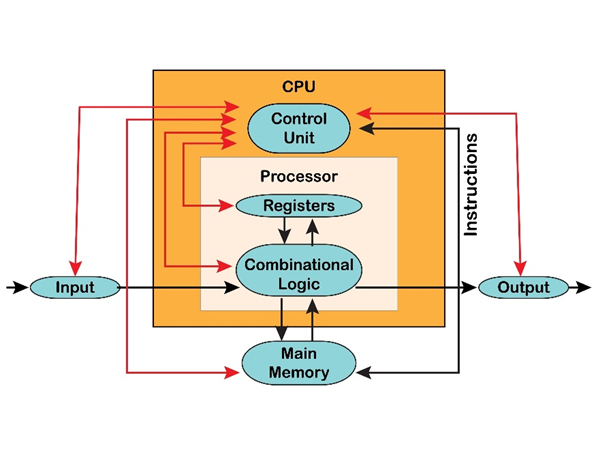
- Definition: Often called the microprocessor or the “brain” of the computer. It executes instructions, performs calculations, and manages all system operations.
- Components:
- Arithmetic Logic Unit (ALU): Performs all arithmetic operations (addition, subtraction, multiplication, division) and logical operations (comparisons like equals to, greater than, AND, OR, NOT).
- Control Unit (CU): The manager of the CPU. It fetches instructions from memory, decodes them, and directs all other parts of the computer (ALU, memory, I/O devices) on what to do.
- System Unit: The main box that houses the CPU chip, the motherboard, power supply, main memory, and other essential components.
https://dtwedustore.com/shop/computer-studies-key-points-by-dtw-tutorials-e-book-22-pages
4.4 MEMORY UNIT
- Primary Memory (Main Memory): Directly accessible by the CPU, fast, and expensive.
- RAM (Random Access Memory): Volatile (data is lost when power is turned off). It is the computer’s working memory; holds programs and data currently being used.
- ROM (Read Only Memory): Non-Volatile (data is retained when power is off). Stores permanent, essential system software like the BIOS (Basic Input/Output System) needed to boot the computer.
- Secondary Memory (Auxiliary Storage): Slower, cheaper, and non-volatile. Used for permanent, long-term storage of files and programs.
- Examples: Hard Disk Drive (HDD) (magnetic disks), Solid State Drive (SSD) (flash memory, faster than HDD), CD/DVD-ROM (optical media), Flash Drive/Pen Drive.
- Storage Units:
- Bit (b): The smallest unit (0 or 1).
- Byte (B): 8 bits.
- Kilobyte (KB): 1024 bytes.
- Megabyte (MB): 1024 KB.
- Gigabyte (GB): 1024 MB.
- Terabyte (TB): 1024 GB.
https://dtwedustore.com/shop/computer-studies-key-points-by-dtw-tutorials-e-book-22-pages
| Memory Type | Volatility | Speed | Function/Use |
| RAM | Volatile (data lost when power off) | Very Fast | Temporary workspace for current tasks |
| ROM | Non-Volatile (data retained) | Fast (Read-only) | Stores BIOS/Firmware (boot instructions) |
| Hard Disk/Flash | Non-Volatile | Slow | Permanent long-term storage of OS and files |
https://dtwedustore.com/shop/computer-studies-key-points-by-dtw-tutorials-e-book-22-pages
4.5 LOGIC CIRCUITS
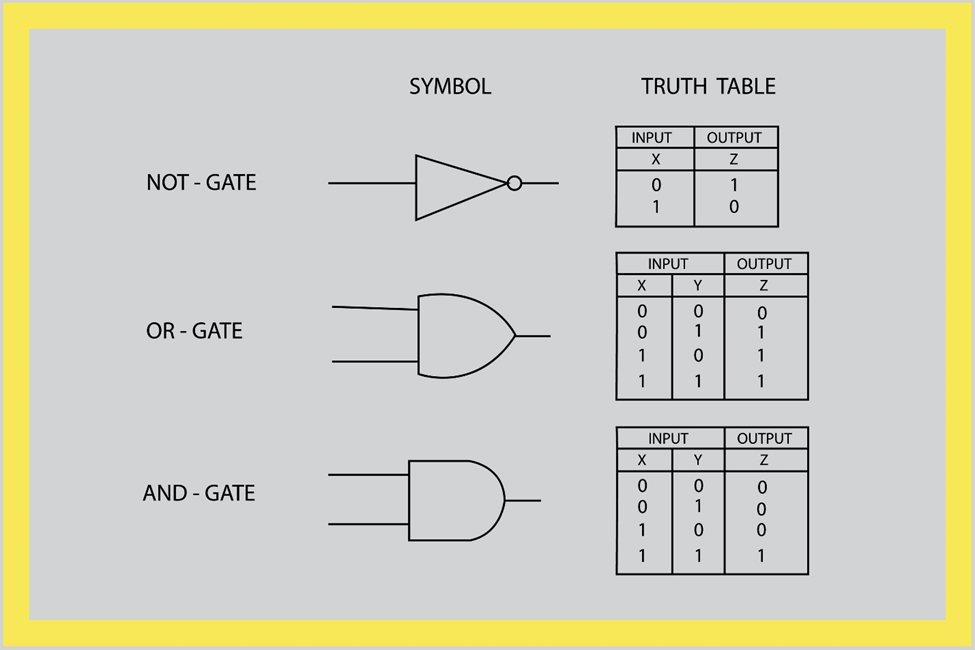
- Logic Gates: The fundamental electronic building blocks of all digital computers. They are circuits that perform a single logical function (Boolean operation) on one or more binary inputs to produce a single binary output.
- Basic Gates:
- AND: Output is 1 only if all inputs are 1.
- OR: Output is 1 if at least one input is 1.
- NOT: Inverts the input (0 becomes 1, 1 becomes 0).
- Alternative Gates: NAND (NOT-AND) and NOR (NOT-OR). These are called universal gates because any other logic gate (AND, OR, NOT) can be constructed using only NAND or only NOR gates.
- XOR (Exclusive OR): Output is 1 only if the inputs are different.
- Uses of Logic Gates: They are used to build complex digital circuits like adders (to perform arithmetic), comparators (to perform logical operations), registers (to store data), and the entire CPU architecture.
JOIN DTW COMMUNITY
Join DTW Tutorials Groups on Facebook, Telegram and WhatsApp Group for Instant Academic Updates Across Nigerian;
WhatsApp Channel – https://whatsapp.com/channel/0029VaAWvTmDDmFT9o25dV3u
Telegram Channel – https://t.me/dtwtutorials1
Facebook Group – https://web.facebook.com/groups/dtwtutorialsgroup/
DTW EDUCATIONAL SERVICES
Go to our website – https://www.dtwedustore.com to purchase your WAEC NECO GCE NABTEB Results Checker Scratch Cards, Text Books, E-Books, Educational Materials etc
Contact us on WhatsApp; https://wa.me/+2348038732879
You can depend on DTW Tutorials to deliver on all your Educational Needs!!
Contact Us today!
– JAMB WAEC BECE NCEE Online Classes both group & 1on1 private classes
– DTW JAMB WAEC BECE NCEE Digital EXAM CBT Past Questions App
– WAEC / NECO / NABTEB Results Checker Cards
– WAEC / NECO / WAEC GCE Original Certificates Processing
– BIRTH CERTIFICATE AND LOCAL GOVT CERTIFICATE PROCESSING
– WAEC / NECO / WAEC GCE Exam Number Retrieval
– WAEC GCE & NECO GCE Registration
– JAMB Form E-pin
– JAMB Profile Code Retrieval
– JAMB Original Results Printing
– JAMB Admission Letter Printing
– JAMB Portal e-facility login access Recovery in the case of Email address & password problems
– Post UTME Registration
We are provide authentic exceptional services!!
DTW Tutorials Study Resource Links;
- The Best JAMB CBT Practice APP By DTW Tutorials – https://dtwtutorials.com/dtw-tutorials-jamb-cbt-app-download-the-best-jamb-cbt-app/
- DTW Online JAMB 2026 Classes, Your Ultimate Path to JAMB 2026 Success! The Best JAMB Online Lessons! – https://dtwtutorials.com/dtw-online-jamb-waec-tutorials-your-ultimate-path-to-jamb-success/
- JAMB 2025 Syllabus Download – https://dtwtutorials.com/jamb-2025-syllabus-free-download/
- 30 Days JAMB Syllabus Challenge Timetable – https://dtwtutorials.com/jamb-2025-syllabus-in-30-days-timetable-challenge-by-dtw-tutorials-cover-your-jamb-syllabus-in-30-days-challenge/
- JAMB Recommended Textbooks for All Subjects – https://dtwtutorials.com/jamb-2025-recommended-text-books-for-all-subjects/
- The Lekki Headmaster JAMB 2025 Novel (Summary, Questions And Answers – PDF Download) – https://dtwtutorials.com/the-lekki-headmaster-jamb-2025-novel-summary-questions-and-answers-pdf-download/
- WAEC WASSCE 2025 Syllabus – https://dtwtutorials.com/wassce-waec-2025-syllabus-free-download/
- 135 PHYSICS FORMULA SHEET BY DTW TUTORIALS – https://dtwtutorials.com/135-physics-formula-sheet-by-dtw-tutorials/



No Comments